

Up until now, I’ve used OneNote (and occasionally discord) to manage my projects. It worked well enough because the majority of my projects have been small games, small-scale creations mostly made for game jams.
But it’s been a few years since I started getting serious about making games and putting my creations out there. I’ve got a good idea of how this bad boi runs, and I’m very familiar with my engine(s) of choice. I’ve gotten the small things out of the way and am now setting my sights on the big stuff–my dream projects.
So why?
Why is it so hard??
Because I have no discipline!
What I couldn’t learn from Game Jams
My stance still holds firm that all fledgling game developers should participate in a few game jams before attempting anything else. My word is law!
Unfortunately, I can’t deny the fact that almost exclusively participating in game jams led me to being ill-prepared to tackle certain hurdles when working on a project.
I overlooked the value of a script
As in scriptwriting. A manuscript? Making a detailed plan of action to assist me with the implementation of the next chunk of my game. Shoddy writing leads to shoddy implementation, after all.
Before now, I would only draft out a simple, generic outline of story beats. A very “we’ll get there when we get there” attitude. But I can’t adopt that same work ethic to these newer, bigger projects that I have in mind. My games are narrative-driven. A lot of the focus and enjoyment comes from what the player learns and how they feel about certain characters. It’s hard to get the player to understand and connect with the characters when said characters have the depth of a sticky note. I need to do better.
I have no discipline because I have no deadlines!
Game jams have deadlines. That’s kind of the whole point. Do something creative in a short timeframe. But deadlines and due dates are just needless stress, right? If i’m making something purely for myself in my free time, then there’s no need to bog it down with unnecessary rules and regulations… right?
WRONG.
When I have all the time and freedom in the world… I am irresponsible. I’ve come to learn and accept that about myself. When there are little to no restraints, I am lazy. I pat myself on the back for completing maybe 2 hours worth of work within the span of a week. I was not working in an efficient and productive manner. I was only doing what I felt like doing. Not what needed to be done.
Something had to change. And so, I set out to find a tool that could better help me manage my workload. Something that could put the fear of a deadline in me.
Kanban boards
I don’t have a PhD in this shit. I can only tell you what I know.
A kanban board is a highly visual tool that one can use to assist in the organization and management of a project. It’s kind of like storyboarding your process.
See the example above? This is Belle’s tried-and-true method of rizzing up a woman. She wrote the names of each woman she desires onto a sticky note and placed them on the board.
First, she will beg for some coochie. If that step doesn’t work, she moves the sticky note to the next column—she will cry pathetically for the coochie. This step usually knocks em dead 😎. When the process is complete, she shifts the sticky note to the final column. Coochie accomplished.
So far, Corin has been successfully courted in this manner. Surely many others will soon follow suit.
Clickup
Clickup was one of the first tools I tried, and it honestly isn’t that bad. it boasts a lot of key features for the free tier (nearly all of these tools have free and paid options). 100 MB storage, unlimited tasks and board members, whiteboards, calendar view, and much more. I honestly don’t think there’s any other kanban tool that has these many features available for free.
My issue with it? Well… for the same reasons i listed above… There’s too much!!
I was overwhelmed with the multitude of tabs and features from the my very first glance! There were tabs dedicated for chatting and communication, documentation, and assigning workloads to members. I didn’t need anything like that! I’m just a solo girlie!
I think clickup may be great if you’re a part of a company or working with a small team, but this was way too much for my needs. I needed something much simpler to keep track my of needs. I didn’t need any of those extra bell(e)s and whistles. I needed something just for me.
I decided to keep this in mind when I sought out my next alternative.
Hacknplan

A project management interface intended for use with game development! Now this seemed perfect for me. The majority of my projects are games, after all!
It was nice to see that the card categories were entirely dedicated to your typical gamedev tasks. I didn’t have to go out of my way to create labels or tags for my tasks. I just quickly selected a pre-existing card, such as “programming”, “bug fixing”, or “art”, and continued on with my writeup. Very convenient.
My issue with it? No offline mode. Not even a desktop or mobile app! (not that it’s a dealbreaker for me… but if I’m forced to stay online, an app to be able to check in on my notes would be nice…)
What’s the big idea? This was supposed to be the perfect tool! The tool tailored just for me! I don’t need it to have internet capabilities!
What if I temporarily lose internet access? It doesn’t happen often, but there are times when an outage occurs once in a blue moon. Either that, or I may be in an area where connectivity is spotty or unreliable. It’s happened before. Sometimes, I welcome the rare moments when my internet acts up, because I can take advantage of those moments to be free of all menial distractions and completely throw myself into my projects! No internet, no excuses!
Oh well. At least now I knew what to prioritize in my next search for an alternative.
Due to the fact that the vast majority of Kanban tools offered out there are online-only, my search for an offline alternative ended up being very succinct. And anticlimactic.
I could only find two.
Kanri
“The best offline Kanban board”
Completely offline, with customizable themes/backgrounds, and colour-coding. Short and sweet.
Everything I was looking for.
Brisqi
Everything I was looking for and more.
I mean it. It has all the features I listed for Kanri above, but also some extra functionality that made it my preference.
The first thing I really love about Brisqi is the “Upcoming task” panel. with this toggled on, I can view a list of all my deadlines. I always check on this a few times a day. Nothing ever sneaks up on me!
The next thing I love about Brisqi is the ability to see the contents of the cards with a quick glance. The majority of Kanban Boards out there require the user to open or expand a card in order to view the contents. That isn’t the case with Brisqi. I can just work so quickly and efficiently with this tool!

I think the pricing model is pretty fair as well. The free tier works well for an individual, though one of the most limiting aspects is the fact that you are limited to only 2 boards. All tiers (with the exception of the cloud sync subscription) are a one-time payment. The cheapest tier is $29.99 and allows access to all features for 1 device and allows for 1 year of updates. You can deactivate and reactivate on a new device as you wish.
I hate recurring/subscription model pricing with a passion, but I think the “purchase for updates” model is a decent balance. This type of model reminds me of the method employed by Clip Studio Paint (my drawing software of choice, if you couldn’t tell). I only purchase an extra year of updates in CSP if there happens to be a major feature from recent updates that I’d like to try. In the 3-ish years since CSP adopted this model, I’ve only felt the need to do this once.
Brisqi isn’t perfect. What I’d like to see from it are as follows
- Notifications or reminders🔔
- Actual colour schemes for the UI🖼️(beyond light/dark mode)
- Calendar view📆
- An emoji/icon selector🙃(they show off emojis extensively in their screenshots of the product on their website)
Trello
I was already sold on Brisqi by this point (literally. I bought a one-time perpetual license), but I introduced my my perfect partner to the concept of Kanban boards and figured they could get some good mileage from using such a project management tool as well. We thought it would be neat to get a glimpse at each other’s projects and progress. So, ironically, I went back on the search… for an online Kanban board.
Trello is obviously a big name in the market so I went for it. I think it’s pretty neat! I can see how it could be useful for a team of collaborators. But I don’t feel bogged down or overwhelmed by a myriad of features, either. The two of us can comfortably make use of it.
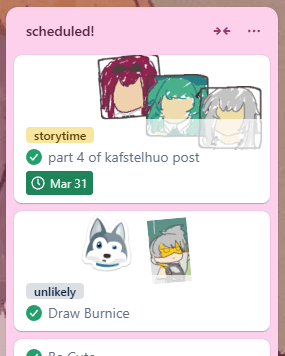
I even made a board for my blog on Trello! I really like that Trello allows me to create an unlimited amount of custom stickers and slap ’em on everything. I like adding my stickers to my perfect partner’s board as well. They have no choice in the matter.
I’m not, however, a big fan of how inconvenient it is to view the contents of cards. I don’t always remember whether or not I set additional info in the description of a card. You can only see the title of a card. You cant see the contents without opening the card.
The plugins in Trello are as much of a blessing as they are a curse. Well no, mostly they’re just cursed. I hate them.
The vast majority of plugins (called “power-ups” on the site) come at a premium cost, but you may not recognize it right away. These plugins will only disclose at the very bottom of their descriptions that you are simply obtaining a trial to use the plugin. A recurring fee/subscription must be paid in order to continue using these add-ons after this trial period. I don’t understand why plugins are displayed in this manner. Why not have a separate tier or category of plugins that can be classified as “paid” or “premium”? It’s annoying.
The “Calendar Power-Up” is the only plugin i’ve been able to find good use in. The official calendar view on Trello is technically a premium feature, but since plugins are “free”, all users have access to a calendar view thanks to the Calendar Power-Up. It’s an official plugin-in by Trello, so it’s actually truly free this time–not some shady trial.
The calendar power-up is also better than the official calendar view because you can scroll freely through the months to view all cards with a due date (as opposed to clicking on a button to view the previous or following months). The calendar power-up is a shining nugget of gold in this wasteland of brown dust.
Another gripe I have with Trello is with how small and easily-dismissible the card icons are. I find myself glossing over the small indicators for a checklist, as well as the deadlines on my cards. It’d be nice if they could be highlighted or formatted in bold text or something. The due dates only appear in a different colour once the deadline is near. “Near” being less than 24 hours, I believe?
Regardless, I think Trello is a good free option to use if online is a necessity.
So, does it even work?
Are Kanban boards actually helpful for facilitating productivity?
For me? Gongaga Yes!
It’s mostly about the deadlines for me. Seeing a deadline, regardless of how arbitrary it is, puts a healthy amount of pressure on me to get the job done. I’ve gone from “i can finish the game whenever I want” to “I must get this specific chunk of gameplay implemented by this date or else.”
It’s been a few weeks since I started using Brisqi, and I’ve already managed to implement the first “introductory” section of my game, fully draft a manuscript for the following segment of gameplay, work diligently on the first chapter of an original story, and drafted/scheduled this post!
This has to be the most consistent I’ve ever been with my personal projects in a long time. I guess people like me simply require structure like this. It helps me get in the right headspace to accomplish my work in a timely manner.
I don’t exclusively use a Kanban board for project management, of course. I use it mostly in conjunction with OneNote. I love using OneNote for brainstorming, outlining, and sometimes scriptwriting. I’ve mostly moved back microsoft word for writing up scripts now.
TL;DR
If you’ve been working on a project(s) for ages with little to no progress, try incorporating the use of a kanban board into your workflow!



 Lovely little creature
send me your thots and prayers